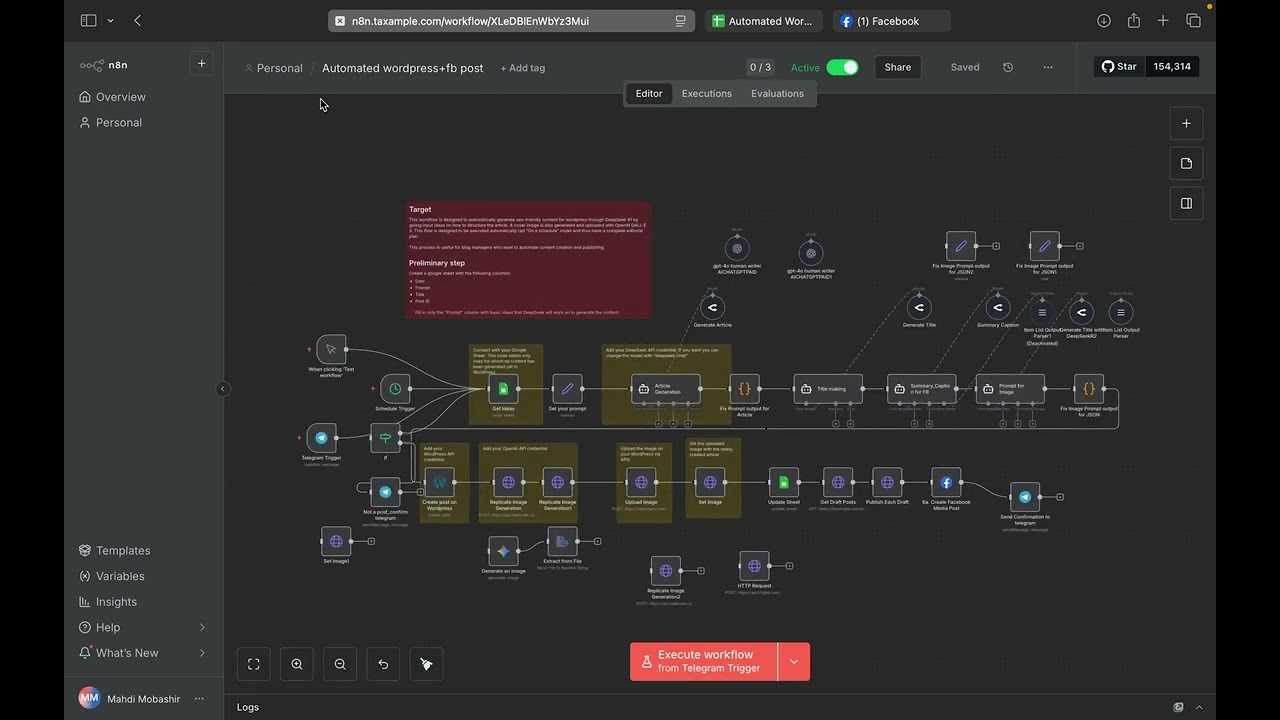

🤖 Transform your content workflow from hours of work to a single click! In this video, I unveil a powerful n8n automation that handles everything from article generation to cross-posting on all major platforms.
This single workflow is a game-changer for bloggers, marketers, and small businesses. We leverage AI to create a seamless, end-to-end content pipeline.
👉 What this n8n workflow automates:
🤖 AI Article Generation: Trigger an automated process to create a well-written blog post using AI (like OpenAI/GPT-4).
🎨 AI Image Generation: Automatically generate a unique, matching featured image for the article using AI (like Stable Diffusion or DALL-E).
🌐 WordPress Publishing: Post the complete article (title, content, featured image, tags) directly to your WordPress site as a draft or published post.
📱 Multi-Platform Social Sharing: Once published, the workflow automatically shares the new post to:
Facebook Page
Instagram (via Creator Studio connection)
LinkedIn Company Page or Profile
🔔 Telegram Notification: Get an instant notification in a Telegram channel or group with the post link and a success message.
✨ Key workflow Nodes We Use:
Trigger: Schedule, Webhook, or Manual Trigger.
AI Nodes: OpenAI, Stability AI, or similar for content & image creation.
CMS Node: WordPress REST API node.
Social Media Nodes: Facebook Graph API, LinkedIn API, Instagram (via Facebook).
Messaging Node: Telegram node for notifications.
📚 Resources & Links:
n8n Official Website:
Download the workflow JSON: [Link to your GitHub Gist or Pastebin]
n8n Documentation:
⏱️ Timestamps: 0:00 – The Magic: See the full automation in action 1:30 – workflow overview and structure 2:45 – Setting up the AI Article Generation (OpenAI) 4:15 – Automating AI Image Creation (Stability AI/DALL-E) 6:00 – Configuring the WordPress Auto-Post 8:30 – Setting up Facebook & Instagram Auto-Sharing 10:45 – Configuring LinkedIn Auto-Post 12:00 – Adding the Telegram Notification 13:30 – Testing the entire workflow 15:00 – Pro-tips and error handling
💡 Who is this for?
Digital Marketers
Content Creators & Bloggers
Social Media Managers
Small Business Owners
Anyone looking to save 10+ hours a week on repetitive tasks!
🔔 Subscribe for more automation tips! Hit the subscribe button and the bell icon to get notified when we post new videos about n8n, automation, and AI.



![How to Use AI for Dropshipping: Virtual Try-On & Image Scraping! [Free Template]](https://n8naiagent.pro/wp-content/uploads/2025/05/1747799338_maxresdefault-768x432.jpg)